

Clips with titles and scores
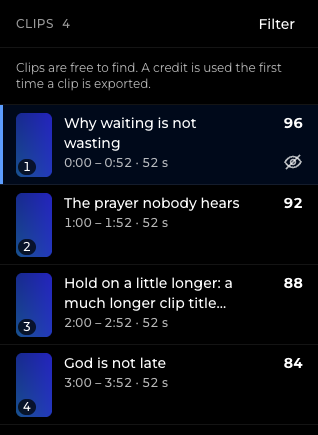
Short vertical clips, each with a title, a hook line and a score out of 100, so you know which to look at first.
Upload a sermon video or audio file. Amplify Studio finds the best moments and makes captioned vertical clips, plus the written pieces to go with them.
Amplify Studio is by invitation. Ask the person who manages your organization to invite you.

You review it all before anything goes out.
Short vertical clips, each with a title, a hook line and a score out of 100, so you know which to look at first.
Captions are added for you. Fix a word or change the look before you approve the clip.
A summary, a devotional, a discussion guide, social captions, YouTube chapters and bulletin notes.
Every sermon stays on your Projects page with its status, so you can come back to it any time.
Upload a video or audio file, or paste a direct link to one.
It writes the transcript, finds the strongest moments and drafts the clips and written pieces. You can leave the page while it works.
Look through the clips, edit the captions, approve the ones you want and download them. Nothing is posted for you.
From our first test run. The same sermon also produced 5 social captions, a summary, a devotional, a discussion guide, bulletin notes and YouTube chapters.
One example, not a promise. Results depend on the recording.
Churches, ministries and the media teams who serve them. If you record a message every week and want to share more of it, Amplify Studio is for you.
Churches, ministries and teams that record sermons or talks and want shorter clips and written pieces from them.
Amplify Studio is by invitation. There is no public sign-up. If your organization already uses it, ask the person who manages it to invite you.
A video or audio recording from your computer, or a direct link to a video or audio file. You can also paste a script or start from a topic.
Ask us. We have not published prices yet.
Amplify Studio is by invitation. Ask the person who manages your organization to invite you.